
BenchBar
Local Frappe and ERPNext development benches on macOS. The benchbar
command line tool installs a bench, runs it in the background under
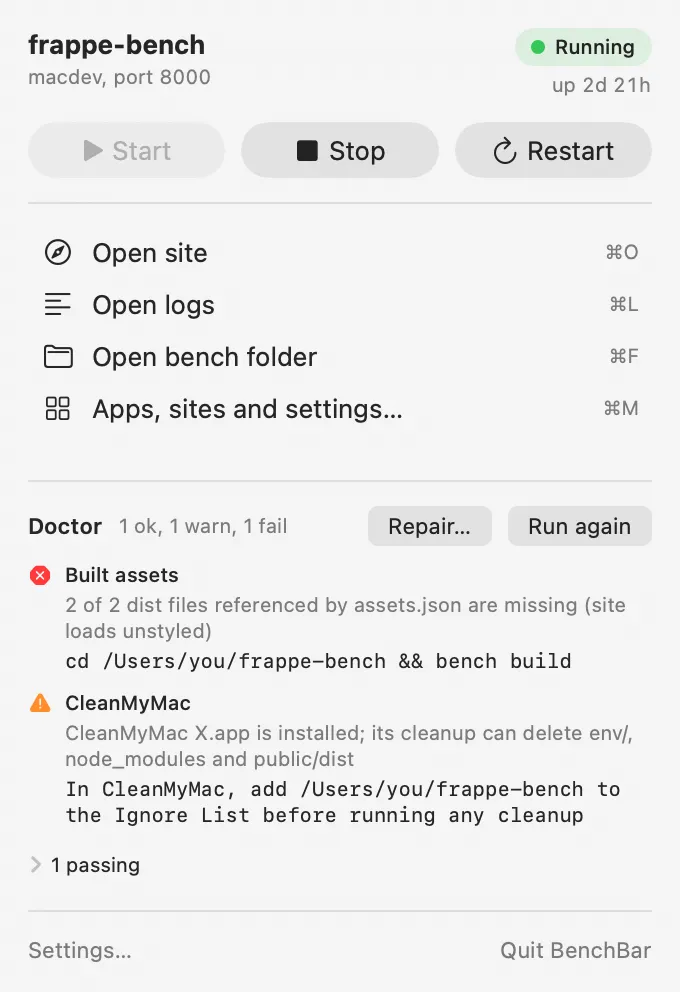
launchd and keeps it healthy. The BenchBar menu bar app shows each bench
as a small runner with start, stop and a health check one click away, and
a window for each bench’s sites, apps and health.
New here? Install BenchBar, then follow the
Quick start. You have a bench already? The quick start
covers that too: benchbar adopt registers it without touching its apps,
sites or databases.
Features
- One command installs everything. Homebrew formulae (Python, Node, MariaDB, Redis), a MariaDB root password kept in your Keychain, the patched Qt wkhtmltopdf, a bench and a site. Re-running it changes only what changed.
- The bench runs in the background. One launchd agent per bench. It survives closing Terminal, comes back after a reboot if it was running, restarts after a crash, and pauses with a notification after three crashes in ten minutes.
- Doctor and repair.
benchbar doctoris read only and names the exact fix for each problem.benchbar repairapplies only the flagged fixes, in order, with a backup before every change. See Doctor and repair. - Existing benches welcome.
benchbar adoptregisters a bench you already have without touching its apps, sites or databases. - A menu bar app. State at a glance, start, stop, restart, the site, the logs, a read only doctor, and crash notifications. The BenchBar window adds a page per bench: sites, apps, doctor and Repair. The app never writes to a bench itself; it runs the CLI and reads its JSON. See The menu bar app.
- Several benches side by side. A v15 and a v16 bench, each with its own ports, sites and scheduler, on one MariaDB. See Benches and sites.
- Apps from anywhere. From the app registry or any GitHub repository,
private ones included (your SSH key or
ghlogin), with a changelog before every update. See Apps. - Made for teams. A team profile sets up a new bench with your apps
and branches; the
benchbar.tomllockfile keeps everyone’s bench the same;benchbar pullcopies a production site into a local one, email muted and scheduler paused. See Teams: profiles, lockfile and pull. - For coding agents.
benchbar mcplets Claude Code, Cursor and other agents read and drive your benches. See Coding agents and MCP. - Shell helpers.
benchup,benchdown,benchrestart,benchstatus,benchlogs,benchwatchand friends. - Bug reports without secrets.
benchbar reportwrites a redacted diagnostics zip.
Requirements
- macOS 14 or later on Apple Silicon. On Intel Macs the CLI works and the app is skipped.
- Homebrew and the Xcode Command Line Tools. The installer offers both.
- About 5 GB of free disk under your home folder, and internet access.
No Docker, no VM, no preinstalled Python, Node, MariaDB or Redis.
Safety
- Every command is check, plan, apply, verify.
--dry-runprints the full plan and changes nothing. A second run saysunchanged. - Generated files carry a version and content hash header. They are
rewritten only when their template or inputs changed, and the previous
copy goes to
.benchbar/backups/<timestamp>/first. sites/, databases,apps/and your own files are never touched. Broken folders are moved aside, never removed.- Stop and cleanup match only this bench’s processes and port listeners.
Your own
bench migrateorbench consolekeeps running. sudois used for two things, the/etc/hostsline and the wkhtmltopdf package, once per run and only after saying why.- The MariaDB root password lives in the Keychain and reaches the client
through
MYSQL_PWD, never on a command line. - Full logs of every mutating run:
.benchbar/logs/<timestamp>.log.
Documentation
- Install: the one line installer, the DMG, building from source, and uninstalling.
- Quick start: adopt a bench or install a new one.
- Benches and sites: daily use, sites, several benches, ports and the scheduler.
- CLI reference: every command, flag and exit code, and Configuration: profiles, bundles, passwords and environment variables.
- Troubleshooting: common stumbles, the cleanup tool case, what recovers on its own, migrating from frappe-mac 0.2, what benchbar writes, wiping a bench.
- Testing: the ten minute guide for testers.
- JSON schema: the JSON the app and scripts read.
- Runners: custom runners for the menu bar.
- Releasing: how releases are built and signed.
- Decisions: every non obvious choice, one line each.
- AGENTS.md: guidance for AI coding agents working on a bench.
- CHANGELOG.md and the Roadmap.
License
MIT, see LICENSE. Frappe and ERPNext are trademarks of Frappe Technologies; BenchBar is not affiliated with or endorsed by them.